FAQs
How Nexus works
Answers for consumers and providers. Button names match the app.
Households
For consumers
Booking, payment, extra work, cancelling, and ratings.
How does Nexus work?
nexusbarbados.com/faq#c-how-nexus-works
Nexus is a marketplace for home services in Barbados. You book a service call at a listed price, pick a provider and a time slot, and pay in the app.
The provider accepts or declines that booking. Extra work is a separate quote.
The apps are not in the stores yet. Join the household waitlist at the consumer list.
How do I get the app?
nexusbarbados.com/faq#c-get-the-app
The Nexus apps are not on the App Store or Google Play yet.
Join the household waitlist at nexusbarbados.com/consumer. You will be emailed when you can create an account. There is no public booking on this website.
How do I create an account?
nexusbarbados.com/faq#c-create-account
When you have app access, onboarding is two steps: Welcome, then Profile.
- Welcome — tap Continue.
- Profile — titled Complete Your Profile. Phone and address are optional. Tap Complete Profile, or Skip for Now and fill them later in settings.
No screenshot of Welcome or Profile on this page yet.
What is a service call?
nexusbarbados.com/faq#c-what-is-a-service-call
A service call is a booked visit at a listed price, with a written scope of what is included and what is not.
Extra work found on site is a separate quote.

What's included vs what's excluded?
nexusbarbados.com/faq#c-included-vs-excluded
Each service lists What's Included, Not Included, and the listed price.
The price covers the included work. Excluded work is not in that price.
If the provider finds extra work, they can send a quote.
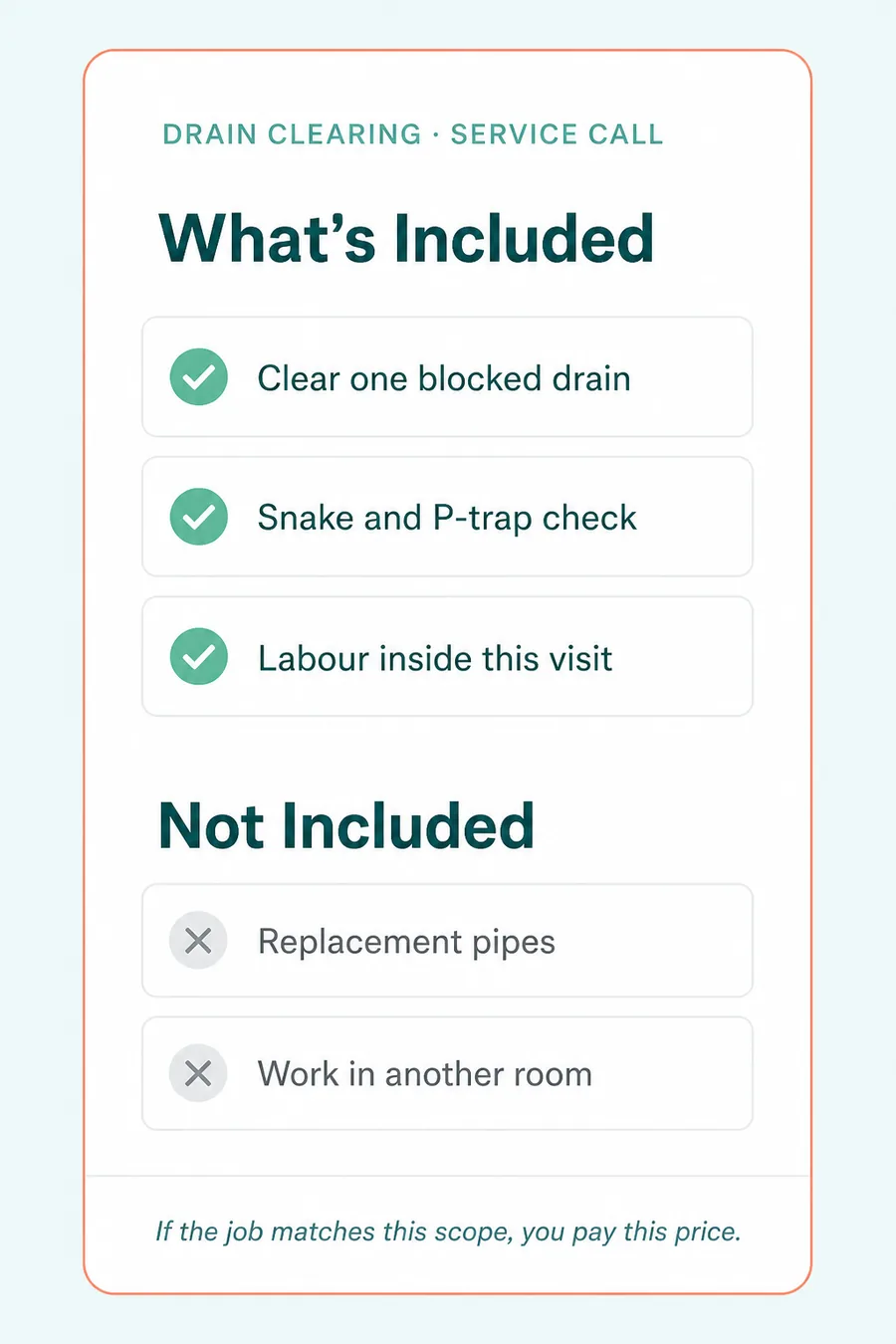
Prices in the screenshots are examples, not live catalog prices.
What if they find extra work?
nexusbarbados.com/faq#c-extra-work
The provider can send a quote for the extra work. You accept and pay, or decline.
Declining does not undo the original visit. If you accept, you pick a new date and time slot. The extra work is not included in the original fee.
How do time slots work?
nexusbarbados.com/faq#c-time-slots
Nexus has three set time slots per day:
- 8–11 a.m.
- 11 a.m.–2 p.m.
- 2–5 p.m.
Times are Barbados local time. When you book, you pick a date, then pick one of the available slots on that date.
In-app reschedule is not available. To change time after booking, cancel and book again.
How do I book a service call?
nexusbarbados.com/faq#c-book-a-service-call
- On Home, pick the service.
- Read What's Included, Not Included, and the listed price.
- Choose a provider.
- Pick a date, then pick one of the available time slots (8–11 a.m., 11 a.m.–2 p.m., or 2–5 p.m.).
- Tap Submit Booking Request.
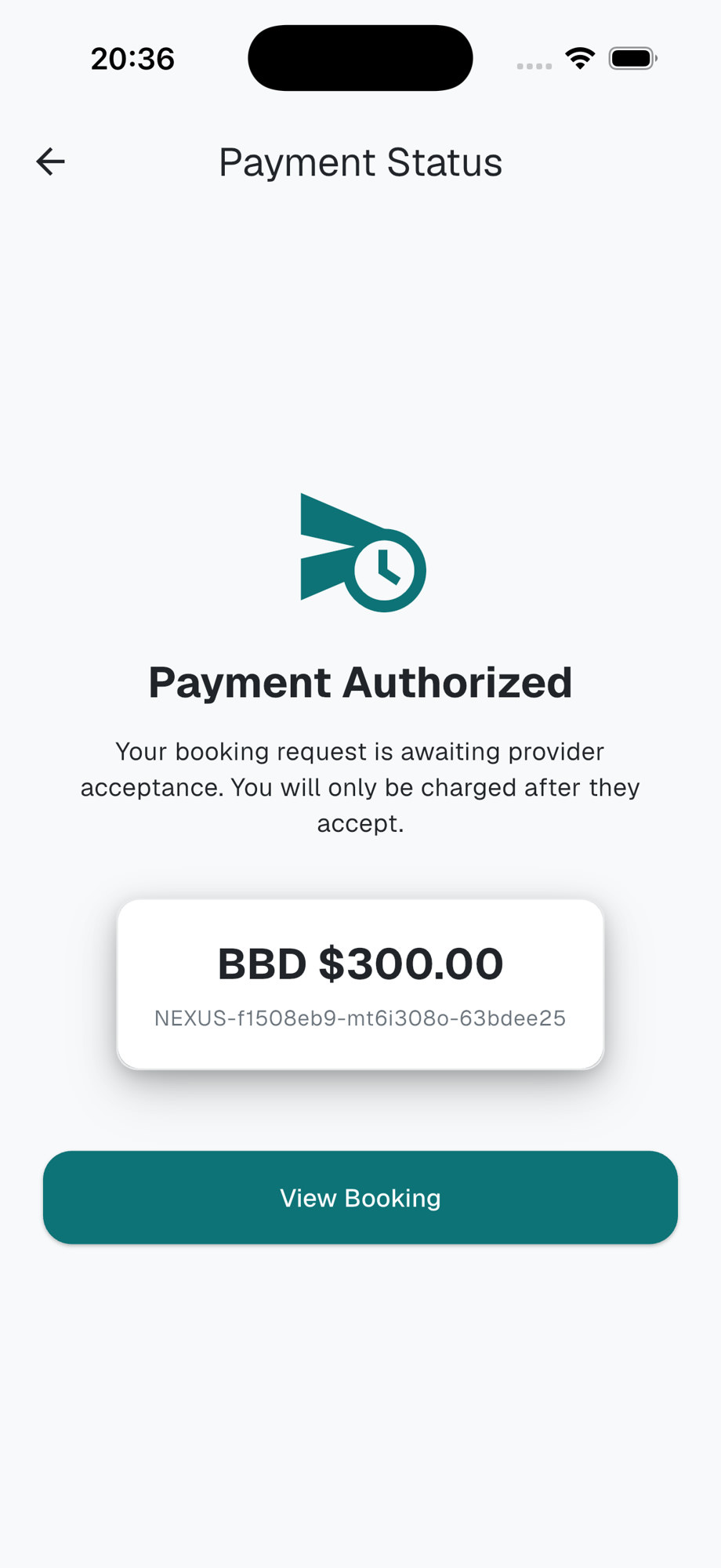
- On checkout, tap Authorize Payment (or Complete Payment if the hosted page opens in an external browser). Card details stay on that hosted page, not in the Nexus app.
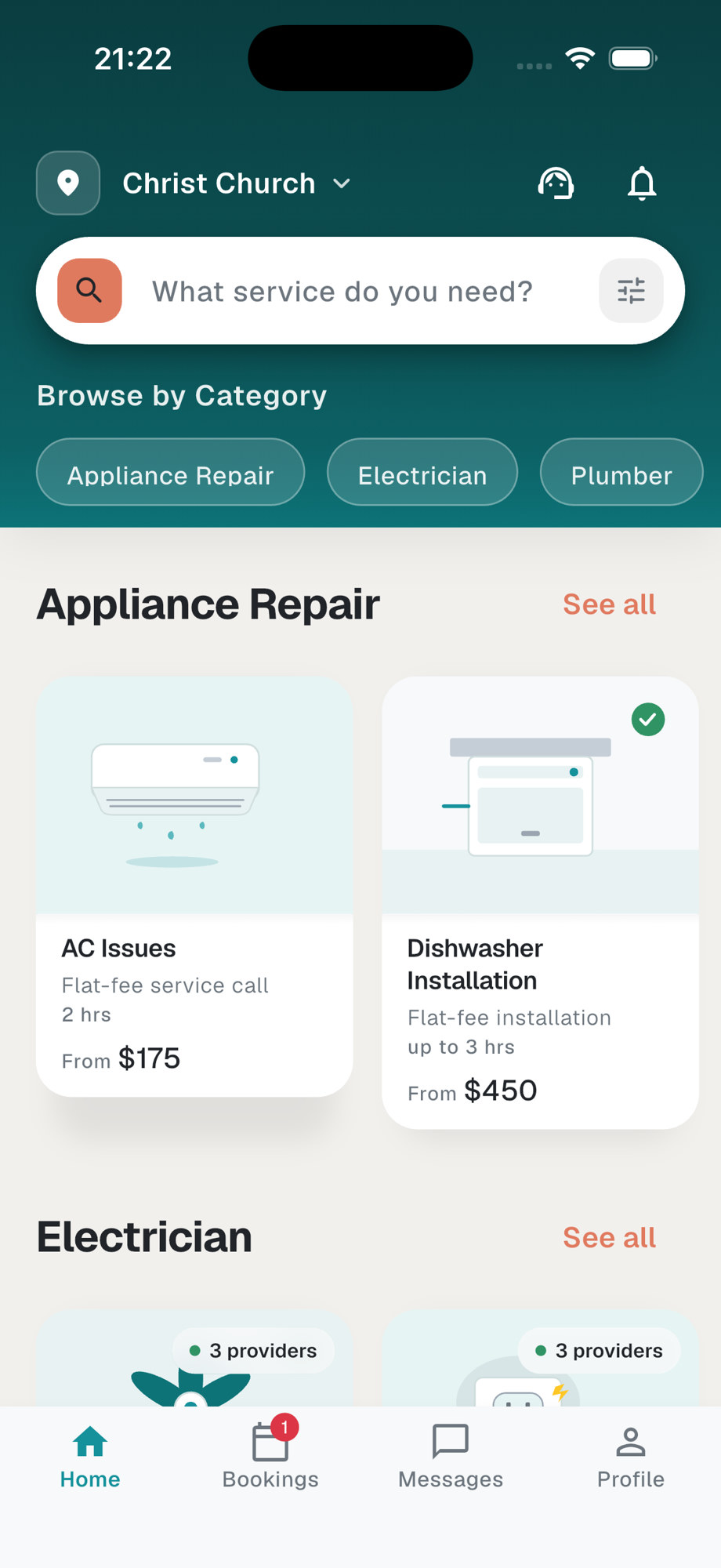
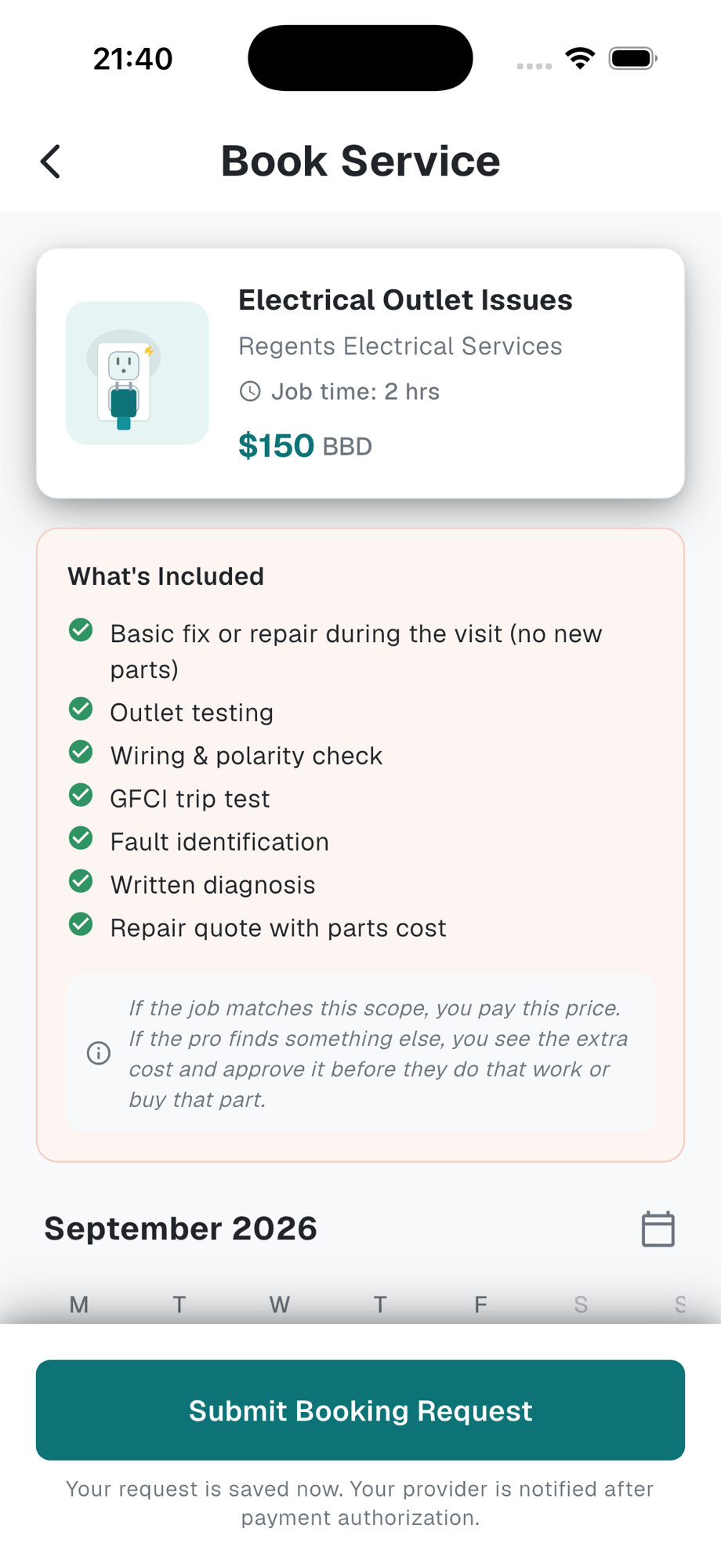
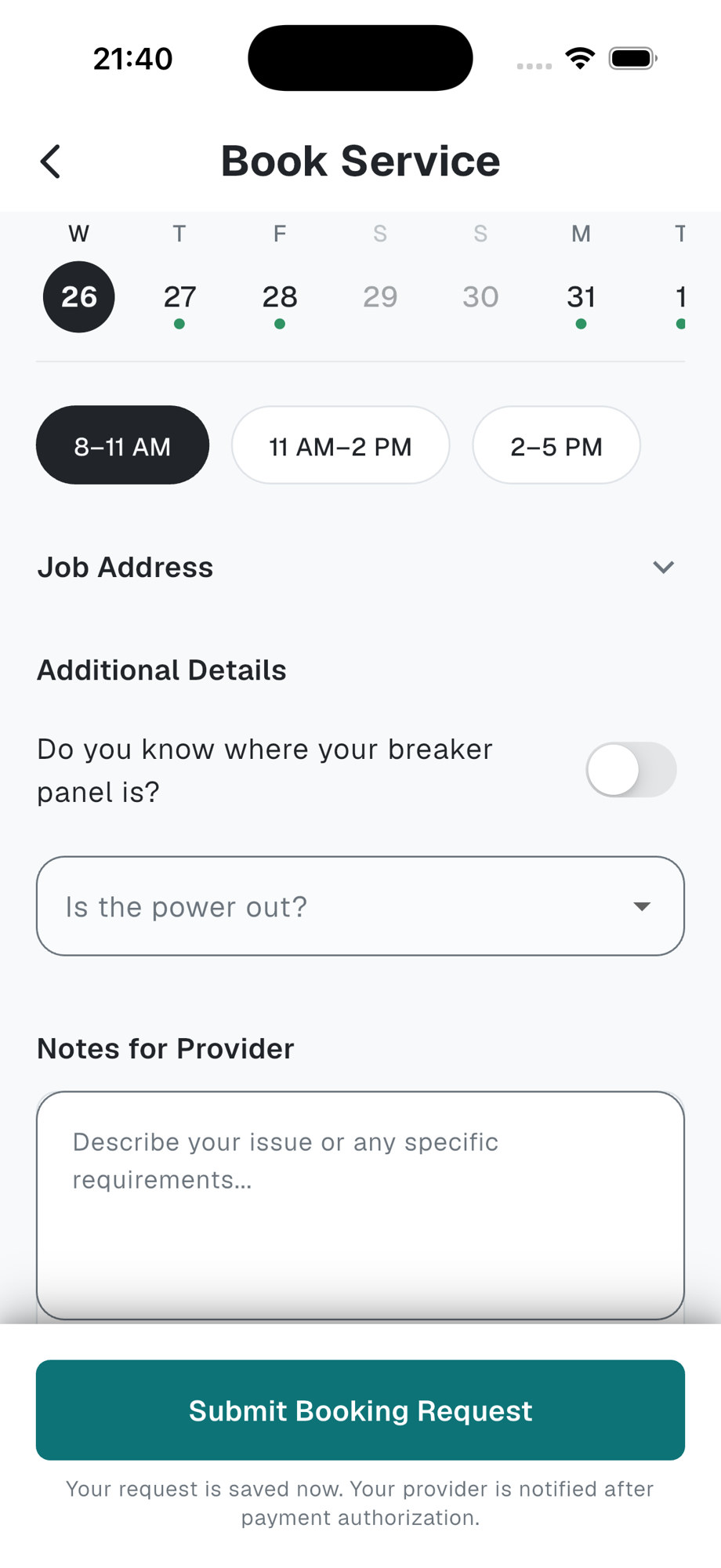
Prices in the screenshots are examples, not live catalog prices.
How do I choose a provider?
nexusbarbados.com/faq#c-choose-a-provider
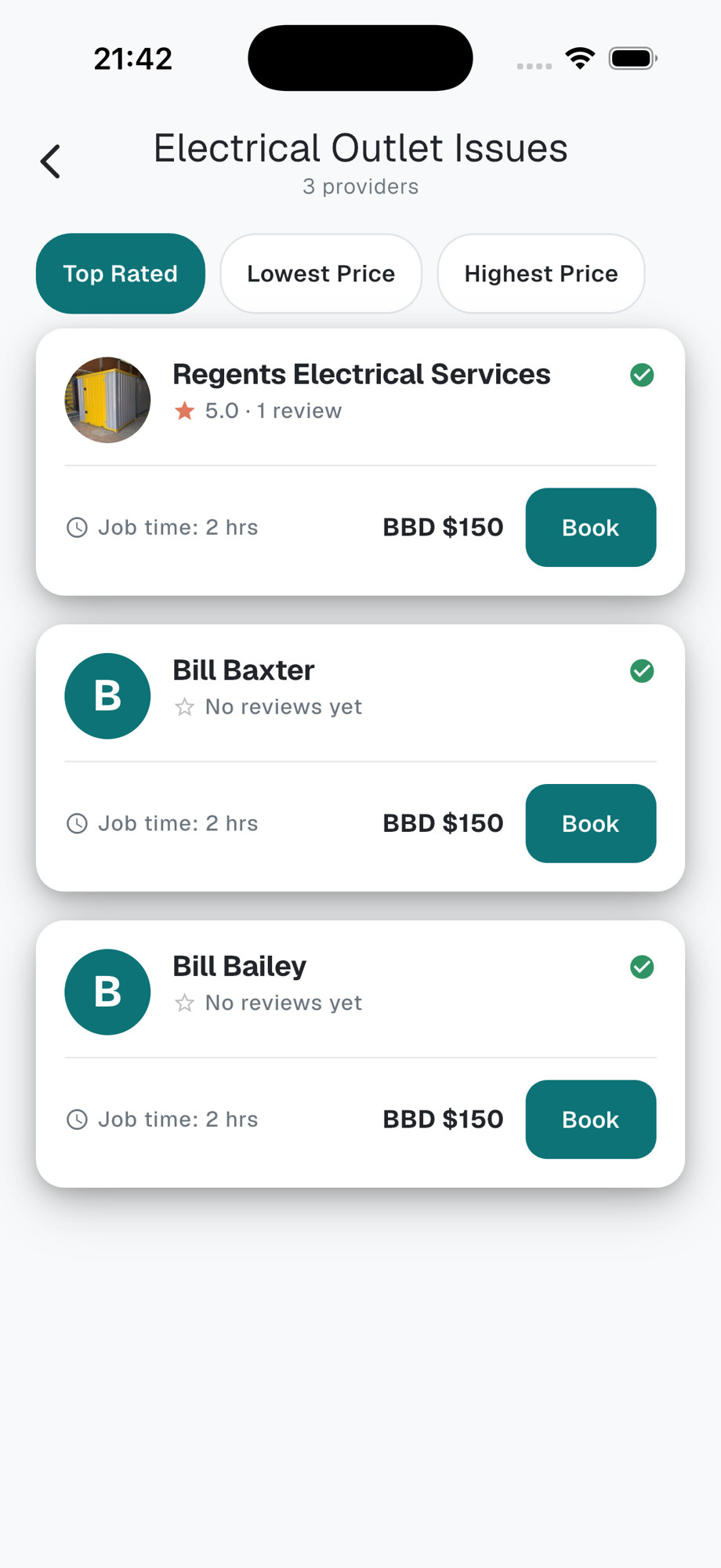
After you pick a service, the app shows providers for that service. Each listing shows ratings (Quality, Professionalism, Value) and whether they are available in your slot.
Tap a provider to continue.
Prices in the screenshots are examples, not live catalog prices.
How does payment work?
nexusbarbados.com/faq#c-payment
Your card is held when you book and charged when the provider taps Accept. You pay in the app on a hosted checkout. This website does not take card numbers.
Nexus collects that payment on behalf of the provider and holds it until release rules clear. That is platform fund holding, not a bank escrow account.
If the provider rejects, or the slot passes while the request is still pending, the hold is released.
What happens after I book?
nexusbarbados.com/faq#c-after-you-book
After Authorize Payment, the booking is a request. The provider sees the job, the price, the address, and the slot. Payment is held.
- Accept — confirms the date and slot. Nexus charges the card.
- Reject — declines the job. The hold is released. You can book someone else.
- The slot passes while still pending — Nexus cancels the request and releases the hold.
No screenshot of the pending booking on this page yet. Status in the app is Pending until they accept, reject, or the slot passes.
What is the difference between extra work identified and a quote?
nexusbarbados.com/faq#c-extra-work-vs-quote
Extra work identified means the provider found more work during the visit. It does not set a price and does not start that work.

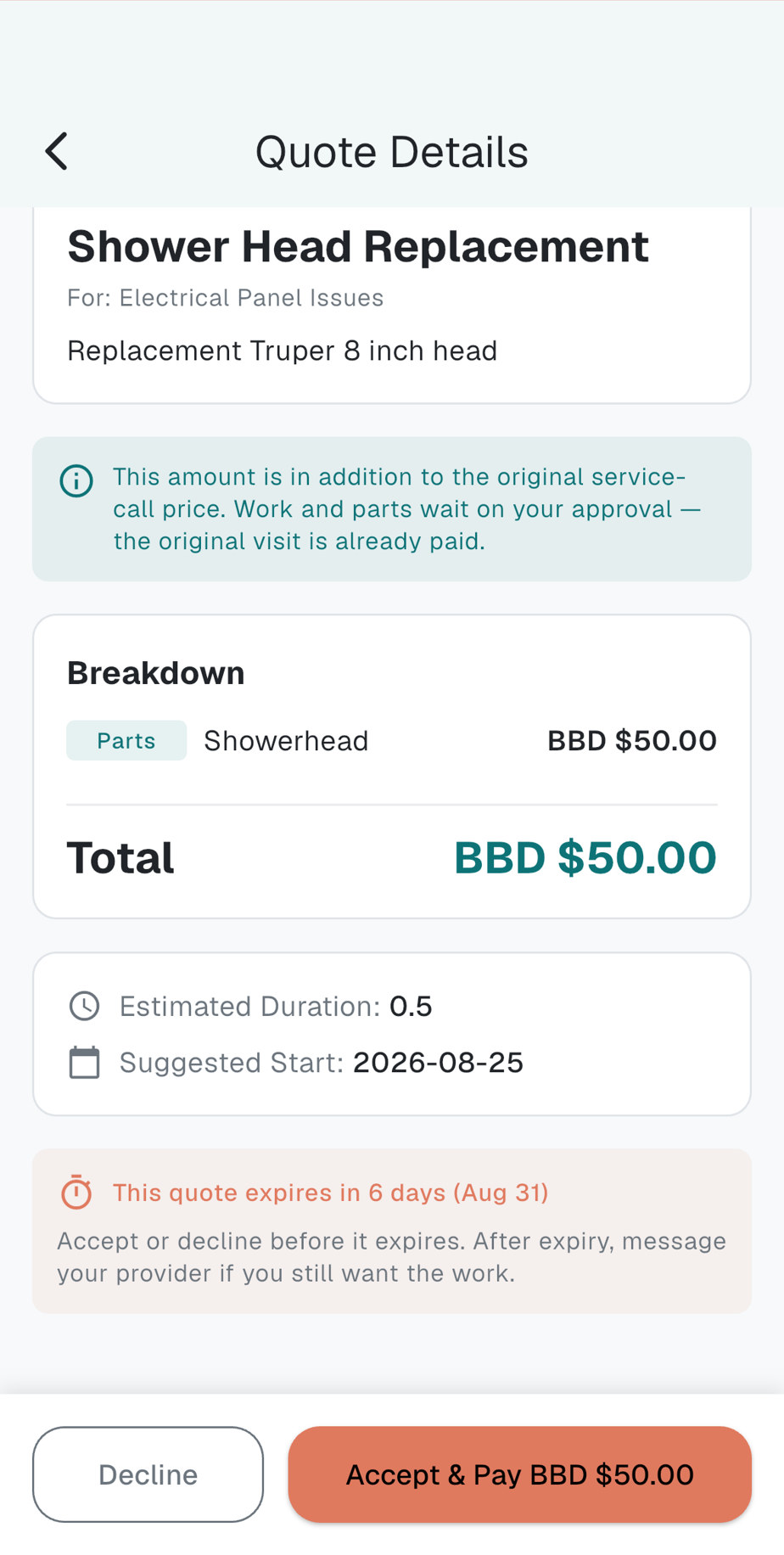
A quote is the priced offer that comes after: line items, a total, and Decline or Accept & Pay.
Prices in the screenshots are examples, not live catalog prices.
How do I accept or decline a quote?
nexusbarbados.com/faq#c-accept-or-decline-quote
- Open the quote on the original service call. You will see line items and a total.
- Tap Decline to refuse the extra work. The original visit stays paid.
- Tap Accept & Pay to take the follow-up. Pick a new date and time slot, then Continue to pay. Payment works the same way as the first visit.
Prices in the screenshots are examples, not live catalog prices.
What is the 24-hour window?
nexusbarbados.com/faq#c-24-hour-window
After the provider taps End visit and submits after photos, you have 24 hours to confirm the work or Report an Issue.
If the window ends with no report, the visit completes.
No screenshot of the 24-hour window check screen on this page yet. The buttons are Verify Completion and Report an Issue.
How do I raise a problem after the visit?
nexusbarbados.com/faq#c-raise-a-problem
- Open the booking while it is waiting on you to verify.
- Tap Report an Issue on Verify Completion. On the booking you may also see Something wrong with this job?
- Write what is wrong and submit. Nexus reviews the photos and messages on that booking.
For help outside that flow, contact Nexus.
When can I cancel?
nexusbarbados.com/faq#c-cancel
You can cancel in the app before work starts, while the booking is accepted or paid. Use Cancel Booking.
- If the card was only held, cancellation releases the hold.
- If the card was already charged and work has not started, cancellation refunds that charge.
- After the provider taps Start work, there is no in-app cancel. Use Report an Issue, or contact Nexus.
In-app reschedule is not available. Change date (cancels this booking) cancels the current booking so you can book again.
Legal terms: Cancellation Policy.
How do ratings work?
nexusbarbados.com/faq#c-ratings
After a completed visit you can rate Quality, Professionalism, and Value, plus an optional comment.
Those averages are shown when you compare providers. There is no separate public Pro Score name in the app.
No screenshot of the ratings screen on this page yet.
How do I contact Nexus?
nexusbarbados.com/faq#c-contact
Email admin@nexusbarbados.com or call (246) 237-6872. Hours: Monday–Friday, 9:00 a.m. – 5:00 p.m. Atlantic Standard Time (AST). Same details on Contact.
Tradespeople
For providers
Joining, calendar, jobs, quotes, and payouts.
How do I join Nexus?
- Waitlist — nexusbarbados.com/provider.
- In person — talk to the Nexus team.
App access comes when you are onboarded. The apps are not in the stores yet. There is no join fee.
What do I need for onboarding?
nexusbarbados.com/faq#p-onboarding
- Phone number
- Legal full name as on your ID
- Government ID photos
- A live selfie (camera only — not a photo from the gallery)
- Police Certificate of Character — within 30 days of going provisional
In the app the steps are Welcome → Business Info → Verification → Email → Complete.
No onboarding screenshots on this page yet.
How does verification work?
nexusbarbados.com/faq#p-verification
You upload government ID photos and a live selfie. Nexus reviews them. Identity approval unlocks accepting new jobs.
A Police Certificate of Character is due within 30 days of going provisional. If that period expires without a certificate, accepting new bookings pauses until you upload it. The dashboard will say Upload police certificate.
What does the dashboard checklist mean?
nexusbarbados.com/faq#p-dashboard-checklist
- Set up your services — consumers only see offerings you enable and price.
- Set your availability — weekly hours plus date overrides.
- Complete verification (or Upload police certificate during grace) — identity first; certificate within 30 days.
- Add bank account details — where Nexus sends payouts. You can accept jobs before this is done; payouts cannot be sent until it is.
- Share your listing — optional. Not counted in the required progress.
How do time slots and my calendar work?
nexusbarbados.com/faq#p-calendar
Nexus has three set time slots per day: 8–11 a.m., 11 a.m.–2 p.m., and 2–5 p.m. Barbados time.
Your calendar controls which of those slots you are available for. The default is Monday–Friday, all three slots. Set a weekly template, then use date overrides to block a day or a single slot.
In-app reschedule is not available. If a request’s slot does not work, reject it so the consumer can book someone else.
No calendar screenshots on this page yet.
How do I set services and prices?
nexusbarbados.com/faq#p-services-and-prices
Tap Set up your services on the dashboard. Enable the offerings you do and set a listed price for each. Consumers only find you for offerings you have turned on.
The listed price is for that offering’s scope. Extra work is a separate quote the consumer has to approve.
What happens when a booking request comes in?
nexusbarbados.com/faq#p-booking-request
A booking request reaches you after the consumer has authorised payment. You see the job, the listed price, the address, the notes, and the slot. The card is held, not charged yet.
Tap Accept or Reject. If you accept, Nexus charges the card. Pending requests are cancelled if the slot starts before you respond.
How do I accept or reject a request?
nexusbarbados.com/faq#p-accept-or-reject
- Open the request. Check price, address, notes, and slot.
- Tap Accept to confirm the date and slot. Nexus then charges the card.
- Tap Reject (some cards say Decline) to decline. The hold is released. The consumer can book someone else.
You cannot change price, address, service, or slot while accepting. In-app reschedule is not available. If the slot does not work, reject it.
How do I start and complete a job?
nexusbarbados.com/faq#p-start-and-complete
- Open the job and tap Start work (list cards may say Start Job).
- Do the booked scope.
- Tap End visit. The dialog asks How did the visit go?
- Choose Fixed on-site, Diagnosis done — follow-up needed, or Could not proceed.
- Submit after photos and a short summary. That starts the consumer’s 24-hour window.
No Start / End visit screenshots on this page yet.
How do I send a quote?
nexusbarbados.com/faq#p-send-a-quote
- From the booking, open the quote builder (after Diagnosis done — follow-up needed).
- Add a title, a short description, and line items (labour, parts, materials) with quantities and prices.
- Tap Save Draft until the consumer has confirmed the first visit.
- Tap Send Quote. The consumer sees Decline or Accept & Pay. If they accept, they pick a new slot. If they decline, the original visit is still paid.
When do I get paid?
nexusbarbados.com/faq#p-when-paid
- Consumer books — card held.
- You Accept — card charged.
- You End visit — the 24-hour window starts.
- Window ends, no open issue — payout becomes eligible.
- Nexus sends the bank transfer.
There is no weekly payday and no join fee. Platform commission exists and is charged only on funded jobs. The rate is in your provider agreement, not on this page.
Nexus is a marketplace operator. It collects the customer payment on behalf of providers and holds funds until release rules clear. That is not escrow and not a trust account.
How do I add bank details?
nexusbarbados.com/faq#p-bank-details
- Open Bank account details in the app (dashboard checklist: Add bank account details).
- Enter bank name and branch, account type (chequing or savings), account name, and account number. Launch payouts are in BBD.
- Save. Only you can create or edit those fields. Support can read them to send a transfer but cannot fix a typo for you.
You can accept jobs before bank details are complete. Payouts cannot be sent until they are.
Can I take cash for Nexus jobs?
No. Do not take cash or any off-platform payment for jobs Nexus introduced.
If a consumer asks to pay you directly, point them back to the app.
What if I cannot make a slot?
nexusbarbados.com/faq#p-cannot-make-a-slot
- Not accepted yet — tap Reject.
- Already accepted — contact Nexus. After acceptance, cancellations refund the consumer. You cannot change the slot in the app.
In-app reschedule is not available.
What is the 24-hour window for providers?
nexusbarbados.com/faq#p-24-hour-window
When you tap End visit and submit after photos, the consumer has 24 hours to confirm or Report an Issue.
Payout becomes eligible after that window clears with no open issue. Keep after photos and messages on the booking.
How do ratings work for providers?
nexusbarbados.com/faq#p-ratings
Consumers see verification signals and rating averages (overall plus Quality, Professionalism, Value) from completed-job reviews.
You see those same dimensions on your completed jobs. There is no separate public Pro Score name in the app.
How do I contact Nexus?
nexusbarbados.com/faq#p-contact
Email admin@nexusbarbados.com or call (246) 237-6872. Hours: Monday–Friday, 9:00 a.m. – 5:00 p.m. Atlantic Standard Time (AST). Same details on Contact.
Is there a weekly payday?
nexusbarbados.com/faq#p-weekly-payday
No. There is no weekly payday and no guaranteed weekly batch. Payouts are sent after a job is eligible.
Faster payout rails are not live yet.